I read about this app on Hacker News — the developer was talking about starting his own business, trying to build a passive income stream. I had already seen the similar Caffeine Zone app, so I immediately searched for DrinkPacer in the App Store. $0.99? Well, considering that costs about the same price as NOTHING YOU CAN BUY AT A BAR, I quickly rationalized the purchase.
Trial by Fire Round 1: Birthday Eve at the club
My thought process went something like this: “Oh, cool, I got this DrinkPacer app. I should try it out. Hmm, disclaimers and warnings, click through those and ignore, ah, here’s the good stuff!”

The settings for “I want to get” are these:
- Relaxed
- Tipsy
- Drunk
- HAMMERED!!@!
A word to the wise: watch out for the “hammered” setting. It does not fuck around. Being as it was going to be my birthday at midnight, that’s what I picked.
Everything started off pretty well — we had some drinks at my place with the crew, including drinking some caffeine (which I was also tracking — gotta get in the caffeine zone!) Before we left, I took a couple shots which should put me solidly into the “hammered” range. It did not disappoint.
The problem was, I quit using the app once I was inside the club. preferring instead to just order another drink whenever mine was empty. If I had followed along with what it told me, I would have probably been less drunk — which would have been a good thing. Just the same, lesson learned.
Don’t set this thing to “hammered” unless you really mean it. For reference, a 160 lb. man would have to drink 6 shots with no break to touch the bottom line of the “hammered” range.
What is the “Without hangover, I can drink” setting?
After I dealt with my hangover and started to mess around with the app a bit, I realized I didn’t understand what the function of the “Without hangover, I can drink…” setting was. I had initially thought it affected the processing algorithm, but it turns out that’s not true.
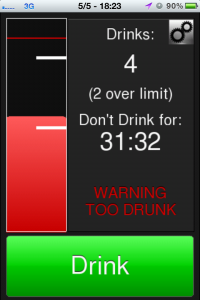
As I understand it, whatever you set for “I can drink…” becomes your “limit” for that night, and the app shows you as “X over limit” when you cross it.
IMO, this doesn’t entirely make sense, since hangover is really determined by your water consumption (and other factors), not the total of drinks that you have.
Since I figured this out, I leave that setting on zero, which is counter-intuitive, but at least the app doesn’t whine that I’m over my limit that way!
Trial by Fire Round 2: San Diego Birthday Adventure
Since I pretty much got destroyed by using this pacer the previous night, I decided to play it safe and set it to “tipsy” the following night. Turns out that “tipsy” is basically keeping yourself mildly drunk for the entire day. It’s not entirely unpleasant, but you will need to drink slower than you expect.
On the bright side, when you go over the limit on the “tipsy” setting, it’s still a pretty pleasant drunk experience since you’re falling into the “drunk” range. Also, it gives you some fun warning messages:


Alex’s tips for using DrinkPacer effectively:
- Keep your drinks logged every time you finish one drink or start a new one.
- Set the “without hangover” to zero. No limit = no “over limit” messages, which are just confusing.
- Set the meter to “tipsy” or “drunk”. Not “hammered”!
Conclusion
Overall, this app is definitely worth your 99 cents. Especially if you’ve read this whole article, you’re probably a professional drinker. The app itself costs the same as the standard tip on a cheap beer, and you can use it over and over. One night of staying in the “drunk” range and you’ll understand.
Suggestions to the Developer of Drinkpacer
One suggestion I had for improving the app would be to recognize that drinks aren’t always consumed all at once and take this into account when inputting a drink. For instance: a beer is generally drank over a period of 10-20 minutes, which could affect your drunk level (versus chugging a beer all at once).
Overall, I use the app as a rough estimate of how drunk I am, and I do appreciate its simplicity (only one button for entry, which makes it easier if you’re drunk).
More importantly, it would be nice to see ALL of the drunk-levels on one bar. Sometimes I’ll set the meter on “tipsy” and end up continuing drinking, and I get concerned because it yells at me. Basically, I’d like a frame of reference for how far over the line of “tipsy” I am.
I think that for anyone who’s purchasing this app, the “without hangover, I can drink” setting is pretty much useless. I was concerned when I was over the “limit”, but ended up with no hangover. Regular reminders to drink water or other advice (pace yourself, eat food) when entering drinks might be more useful for preventing a hangover.
It would be nice if the app remembered my settings, but this is more of a nitpick.
It would also be cool if I could see a graph of my drunkenness after a night on the town. And I think it’s a one-man dev shop, but how about an iPad version that lets you track you and your friends’ drunk levels? That’s sort of a pie-in-the-sky idea, but hey, that’s what I do here.